Klanul Urban din Romania
De pe acest forum puteti downloada gratis filme,muzica,jocuri,soft,clipuri,cu alte cuvinte orice.Daca ceea ce cauti nu exista,cere doar si o sa ai.
|
Lista Forumurilor Pe Tematici
|
Klanul Urban din Romania | Reguli | Inregistrare | Login
POZE KLANUL URBAN DIN ROMANIA
Nu sunteti logat.
|
Nou pe simpatie:
alexxandra
 | Femeie
24 ani
Timis
cauta Barbat
26 - 59 ani |
|
Mister President
Memberu Puf
 Inregistrat: acum 19 ani
|
|
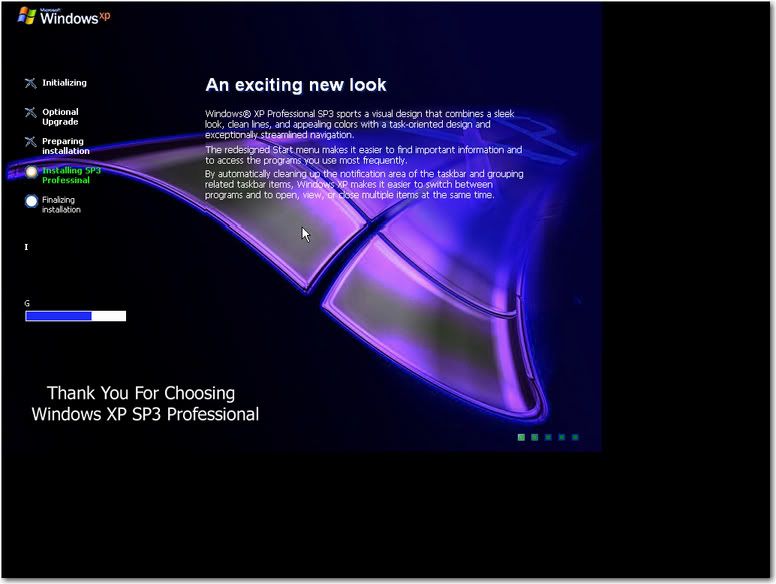
Windows Xp Setup Background Changer allows you to change Your boring background while windows xp is being setup......some features given below..
-you can change windows setup background
-you can change windows logo
-you can change animated bars
-you can change progress bars.
- you can change licence texts
-You can change bars colors
and many more...its amazing
thanks .....AMIT |
NOTE: this requires winntbbu.dll type files , which are on your windows xp installation cd in I386 folder...find it and make change them...as usual you cant make changes on cd...so u must copy whole xp cd on HDD and change this one!! after that you can burn your changed files on cd!!!
here what can you change in your setup board
In its current Version this editor only allows editing of
the following in Winntbbu.dll:
*Colors
*Fonts (Large & Small)
*Headlines & Billboards
*Step Texts
*Pictures (HighColor & CDBoot only):
Backgroundimage
Step Images
Top-Left-Logo
Processinganimation
----------------------------------------------------------
Preview:
The Preview is currently only available for small
resolution setups. Only changes made to the appropiate
Resources will take visual effect. Of Cource all made
changes get written to the dll.
SysSetup:
Though for visual completeness Texts from syssetup.dll,
if present in the same directory as the selected
winntbbu.dll, are displayed, they are, at least at the
moment, not editable.
Pictures:
There are no validation Checks on the Bitmaps
that you might use, so have to take care yourself.
All Pictures are limited to the use of Bitmap Images.
Every Bitmap has a display in the pictures editor
with its current size, hold the mouse over that,
and you will get a tip with the size microsoft has
intended.
Fonts:
The font that you use MUST be present and registered
at the time of setup.
Since only Fontname and Fontsize are stored in the .dll
even though the dialog for fonts allows it, you cant use
styles like bold etc.
Dont Knows:
There are still some aspects in the resources
i dont know what they are good for, any additional
information is welcome. |
DOWNLOAD:
Code:
http://rapidshare.de/files/3457489/WinntbbuED.exe.html

OR

http://www.megaupload.com/?d=VRZ9TVAG |
_______________________________________
Love isn`t love when nobody shows you love...love is love when everybody shows you love!

|
|
| pus acum 19 ani |
|